In this article
The AI that can’t open your model
Your AI assistant can draft the RFI response, summarize a spec section, and clean up the meeting minutes. Ask it which girder on level 3 has the highest demand-to-capacity ratio, and it guesses. Not because it isn’t smart enough, but because it has no way into your model.
That gap is closing. The Model Context Protocol, or MCP, is an open standard that lets AI applications connect to the software and data that engineers already use. Think of it as a power outlet for AI: one standard socket, and every tool plugged into it becomes something the AI can actually work with.
I come at this from two sides. My work with Dlubal Software puts me in an environment where MCP is already part of the product, and I’m developing my own model-review software for IFC models. This article explains what MCP is, what it’s good for in AEC, and why connecting our tools to the AI platforms engineers already use usually makes more sense than building yet another chatbot.
What MCP is: an outlet, not a brain
MCP doesn’t make AI smarter. It gives AI a standard way to reach things outside itself: your models, your analysis engines, your project data.
Picture the temporary power spider box on a jobsite. It doesn’t care whether you plug in a saw, a grinder, or a work light, because every tool has the same plug. Before MCP, connecting an AI to an application meant custom wiring for every pair: five AI apps and twenty programs meant up to a hundred one-off integrations. With MCP, each AI application implements support for a common protocol, and each program exposes the required tools through a server. This removes much of the custom integration work for individual pairs. Each connection still needs the right setup and permissions.
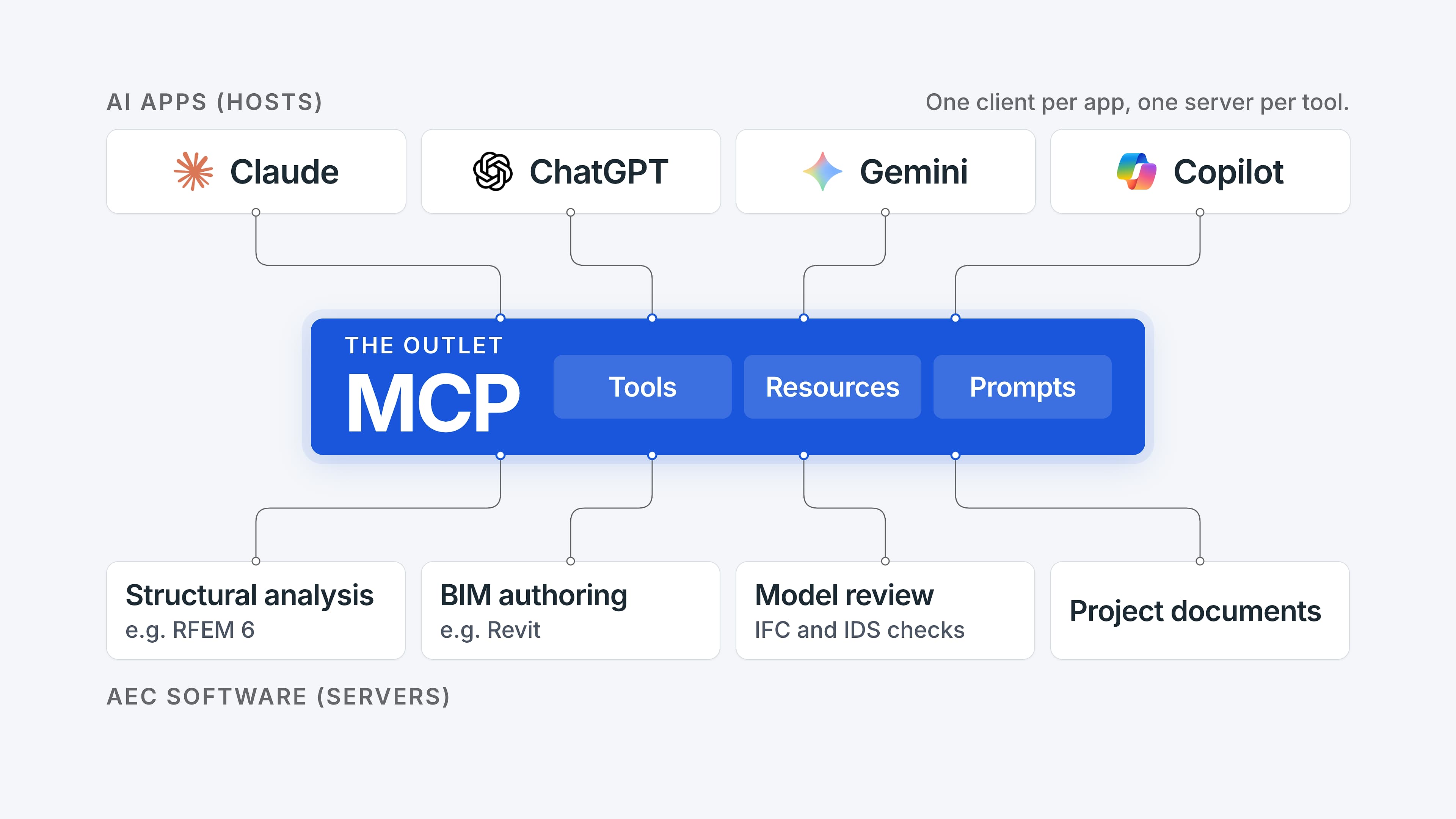
The host AI application can manage multiple MCP clients, typically one for each connected server.
Anthropic released MCP as an open standard in November 2024. In December 2025, it handed the standard over to the Agentic AI Foundation under the Linux Foundation, backed by OpenAI, Google, Microsoft, and AWS, among others. Today ChatGPT, Claude, Gemini, Microsoft Copilot, GitHub Copilot, and Cursor all support it.
Three roles, in plain terms:
- Host: the AI application you type into, such as ChatGPT, Gemini, Claude, or your company’s own chatbot.
- Client: the connector inside the host that keeps the line open to one server.
- Server: a small program on the software side that tells the AI what it can do. RFEM, Revit, and an IFC review tool would each get their own.
What a server offers:
- Tools are actions the AI can call: check a model against the project’s data requirements, compare two model versions, start an analysis.
- Resources are data the AI can read: a model summary, a list of load cases.
- Prompts are prepared workflows: “review the changes between versions A and B.”
The key detail is discovery. Each tool comes with a description and a structured definition of its inputs. When you ask a question, the AI uses those to choose a tool and supply the information it needs. Nobody hard-codes which button to press, but the application decides which tools are available.
A server can run locally, right next to your desktop application. The model file stays on your machine; only the answers the tools return are sent to the AI. Or it can run remotely over HTTPS with a proper sign-in, which suits cloud platforms. If IFC is how a model describes a building, MCP is how an AI asks that model questions.
Why AEC needs it: guessing vs. computing
MCP turns AI from a confident guesser into a coordinator that hands each task to a tool engineers already trust. That distinction matters more in our industry than almost anywhere else.
A general-purpose language model predicts plausible text. Ask it to check a beam and you get a well-formatted, confident answer that may simply be wrong, because it never ran the numbers. With MCP, the AI delegates: the calculation goes to the analysis engine, the question about the model goes to the model, and the AI does what it’s genuinely good at. It understands the question, runs the steps in the right order, and explains the result in plain language. It can still choose the wrong filter or misread a result, so the connection alone doesn’t make an answer reliable. It makes it checkable.
MCP isn’t the only way to get project information into an AI, so it helps to see where it fits. Copying and pasting a results table into chat works, but it’s a manual snapshot that goes stale the moment the model changes. Retrieval-augmented generation (RAG) lets AI search documents, such as a design standard, a BIM Execution Plan, or a product manual, and quote what it finds.
These aren’t competing technologies. MCP is the connection; a document search is one kind of tool you can connect. It can sit behind an MCP server just as well as a tool that queries a live model or runs a check. The useful difference is what each tool can do. A document search answers “what does the standard say?” A model tool answers “what does my model say, and does it pass?” Most serious AEC workflows will use both.
Custom integrations, like a vendor’s built-in assistant, also reach live data, but each one wires one AI to one application. MCP makes the same tools reusable by any AI app that supports it, within the limits of each app’s setup. The AI can do exactly what the tools allow, nothing more.
What does that look like on a real project? These requests are already possible with servers that exist today:
- Model queries: “Find every fire-rated door on level 2 without a hardware set and select them.” Autodesk’s official Revit server can search the model and select the results.
- Quantities: “How many cubic yards of concrete are in the slabs, story by story?” Open-source servers read this straight from an IFC file, as long as the model holds reliable quantities.
- Coordination: “Which issues from last week’s coordination meeting are still open?” Coordination platforms such as Revizto now offer MCP servers, and community servers reach issues and RFIs in Autodesk Construction Cloud.
- Analysis results: “What’s the maximum deflection of the floor beams under service load combinations, and is it within L/360?” The answer comes from the analysis program, not from the AI’s memory.
Why plug into the AI giants instead of building our own chatbot
Let the AI companies do language; let AEC software do engineering. Every few months someone in our industry announces a proprietary assistant. Building your own chatbot doesn’t mean building your own language model, though. Most custom assistants run on the same commercial models behind their own interface. The real question is where the engineering tools live, and MCP keeps them reusable whichever interface your team ends up using. Here’s why starting with the AI platforms your team already uses usually makes sense.
- You get the most capable AI models, and they keep improving. No engineering firm or AEC vendor can match the research budgets of Anthropic, Google, OpenAI, or Microsoft. As the models improve, they tend to get better at choosing tools and explaining results. That isn’t automatic for every workflow, so retest what matters when the AI model changes.
- Engineers already work there. Many firms already pay for Microsoft 365 Copilot, ChatGPT, Claude, or Gemini. A new standalone chatbot adds another interface that the team has to learn and fit into its workflow. If the assistant your firm already has supports the connection you need, an MCP server shows up where people already work.
- Build once, plug in anywhere. The same server can be reused in Claude, ChatGPT, Gemini, Copilot, and AI assistants a firm builds for itself. Each app still needs its own connection setup, and not every product supports every feature. But if your firm switches AI providers, the engineering tools don’t have to be rebuilt. Even direct competitors such as OpenAI, Google, and Microsoft back the standard.
- Tools start working together. One conversation can query the model, run an analysis, fill a spreadsheet, and file the result in your document system. That kind of cross-tool workflow used to require a custom script for every step.
- Your expertise stays yours. The vendor keeps the validated solver, the design-standard checks, and the data model. The AI platform supplies the conversation layer on top. Domain knowledge stays the competitive advantage, which is exactly where it belongs.
There is a sixth, quieter benefit. The big hosts bring enterprise plumbing that a small AEC tool would never build on its own: admin approval of connectors, permission prompts before a tool runs, and sign-in through standard protocols. In Microsoft 365 Copilot and Gemini Enterprise, for example, an IT admin can register a custom MCP server once for the whole organization.
Three kinds of access
The right question isn’t whether to let AI into your model, but what it may do there. Your firm decides that, not the AI. MCP makes the boundary visible because every server declares exactly which tools exist. What matters is what those tools can do and the permissions behind them, not the label on the server.
Reading. The AI queries models and data: it lists the fire-rated doors on a level or pulls the properties of a single element. Read-only access limits changes to the model. It doesn’t make the information less sensitive, and it doesn’t prevent a misleading answer.
Checking. The AI runs checks: an IDS validation, a clash report, a comparison between revisions. IDS is a buildingSMART standard for expressing selected information requirements in a machine-checkable form. You specify which elements need which data, and a checker tests the model against those rules. It checks the information, not whether the building is correctly designed. The findings inform decisions, so a person reviews them.
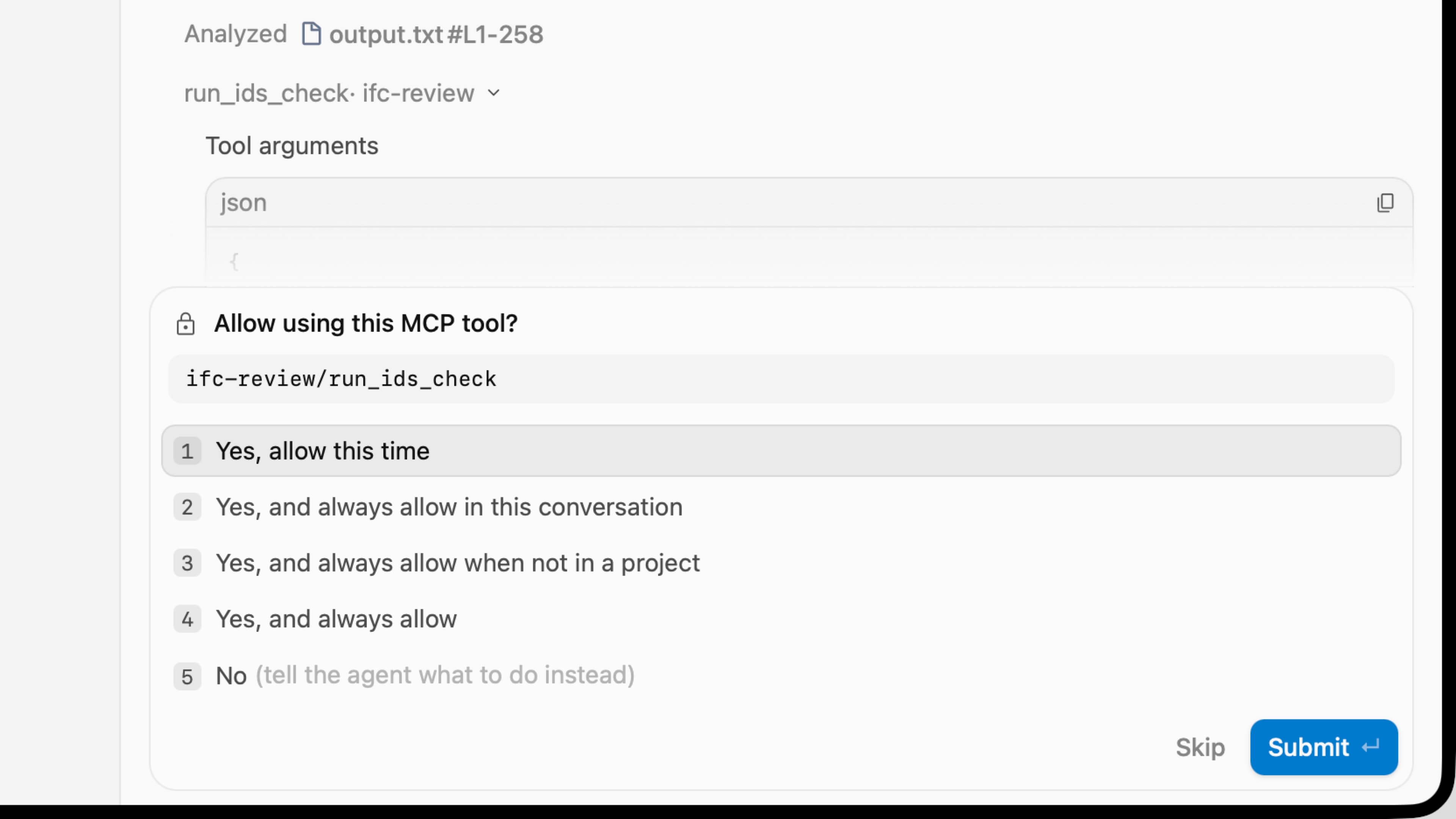
Writing. The AI changes the model itself: it fills in parameters, moves elements, or creates new ones. That needs controlled permissions, a review of each change, and a way to undo it.
Autodesk’s Revit servers show how vendors are drawing these lines. The first Revit MCP server, released in June as a technical preview, was read-only. In September, Autodesk added a Trusted-Write server, which lets you review every change an agent makes, and an Experimental server with broader editing tools, which Autodesk describes as “use at your own risk.” Both are technical previews for Revit 2027. For most firms, reading is the right place to start, on a test model the firm has approved.
What I built and the six tools
To test how high the barrier really is, I built a read-only MCP server for the model-review software I’m developing. It already checks IFC models against IDS requirements and compares model versions. The validation itself isn’t new; the software did it before. What the server adds is a way to ask follow-up questions, connect the steps, and jump straight to the affected elements.
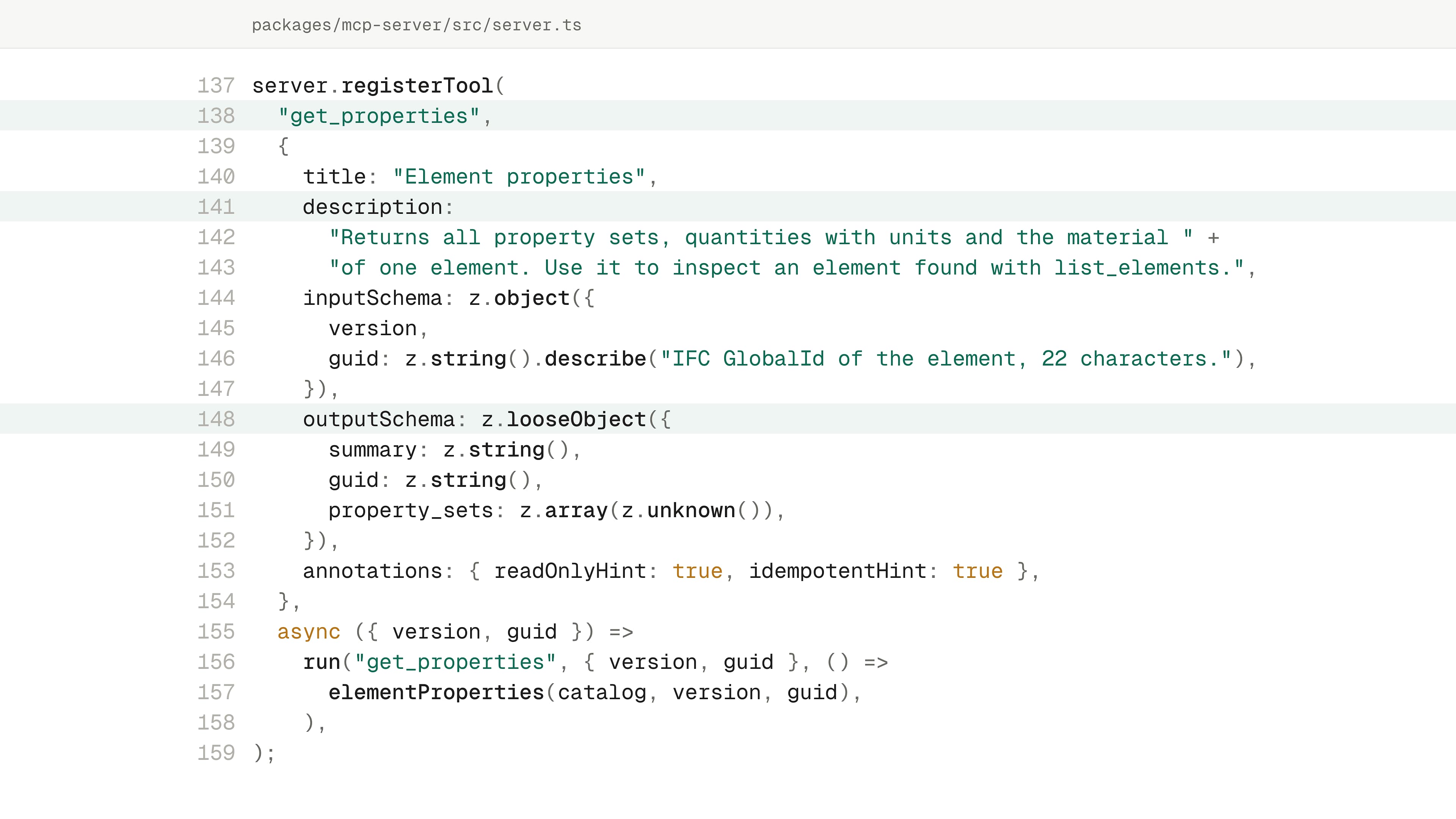
Show the code as text
server.registerTool(
  "get_properties",
  {
    title: "Element properties",
    description:
      "Returns all property sets, quantities with units and the material " +
      "of one element. Use it to inspect an element found with list_elements.",
    inputSchema: z.object({
      version,
      guid: z.string().describe("IFC GlobalId of the element, 22 characters."),
    }),
    outputSchema: z.looseObject({
      summary: z.string(),
      guid: z.string(),
      property_sets: z.array(z.unknown()),
    }),
    annotations: { readOnlyHint: true, idempotentHint: true },
  },
  async ({ version, guid }) =>
    run("get_properties", { version, guid }, () =>
      elementProperties(catalog, version, guid),
    ),
);
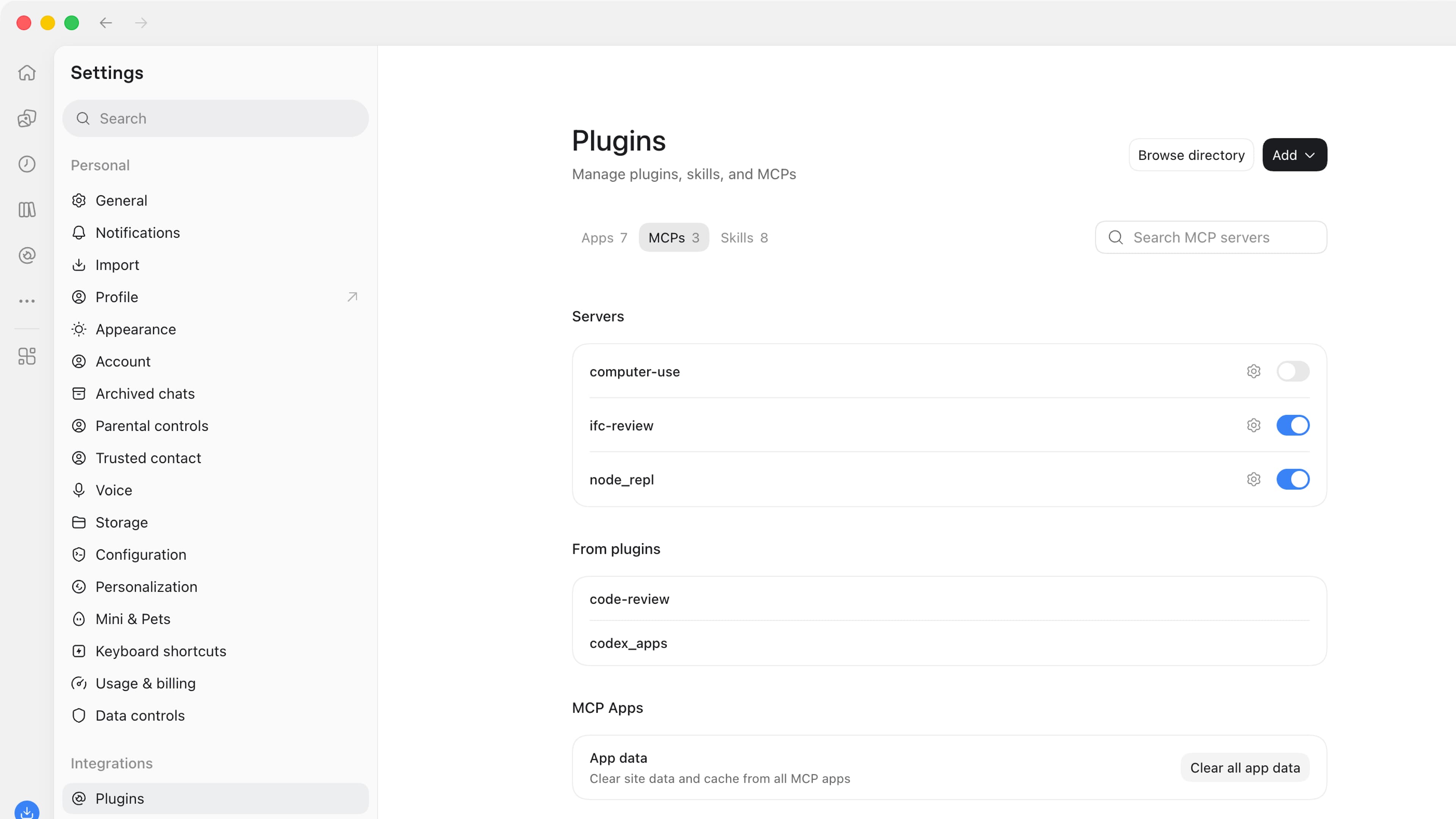
The server is called ifc-review and exposes six tools, all read-only:
get_model_summary: project, versions, stories, element countslist_elements: find elements by IFC class, story, or load-bearing flagget_properties: property sets, quantities, and materials of one elementrun_ids_check: validate a version against an IDS filecompare_versions: what was added, removed, or modified between two versionsget_viewer_link: a link that opens the 3D viewer with the relevant elements highlighted
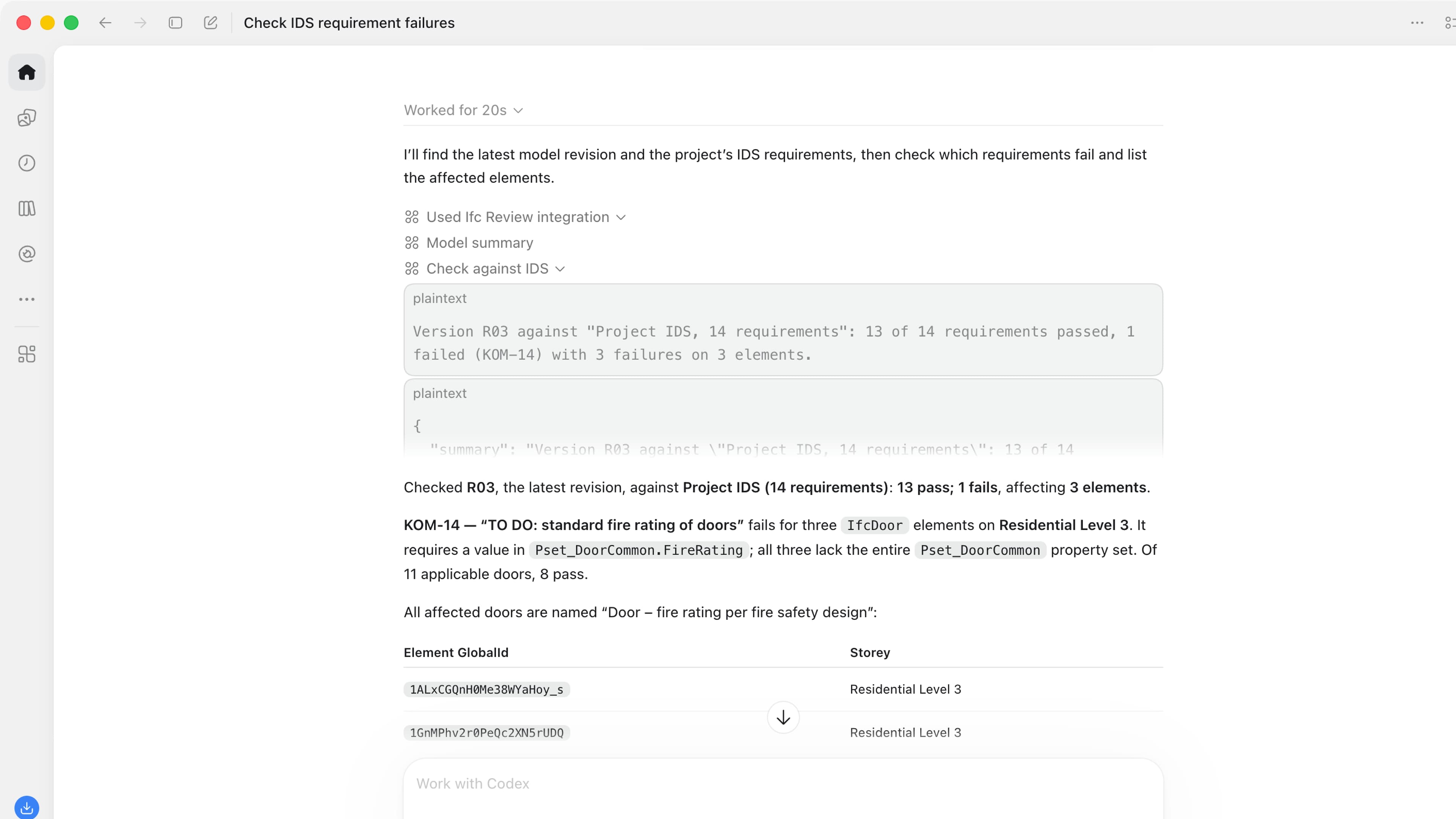
Then I ran the test on a real model: a concept model of a residential building in Prague, with a street-level garage, three residential levels, and an attic, checked against an IDS file with 14 information requirements. I asked which requirements failed and which elements were affected. Two requirements failed on 13 elements: two roof windows without a thermal value and 11 doors without a fire rating. The door names said the fire rating would be set in the fire safety design. That explains why the value is missing. It doesn’t provide one, and whether the value is required at this stage is a decision for the project team.
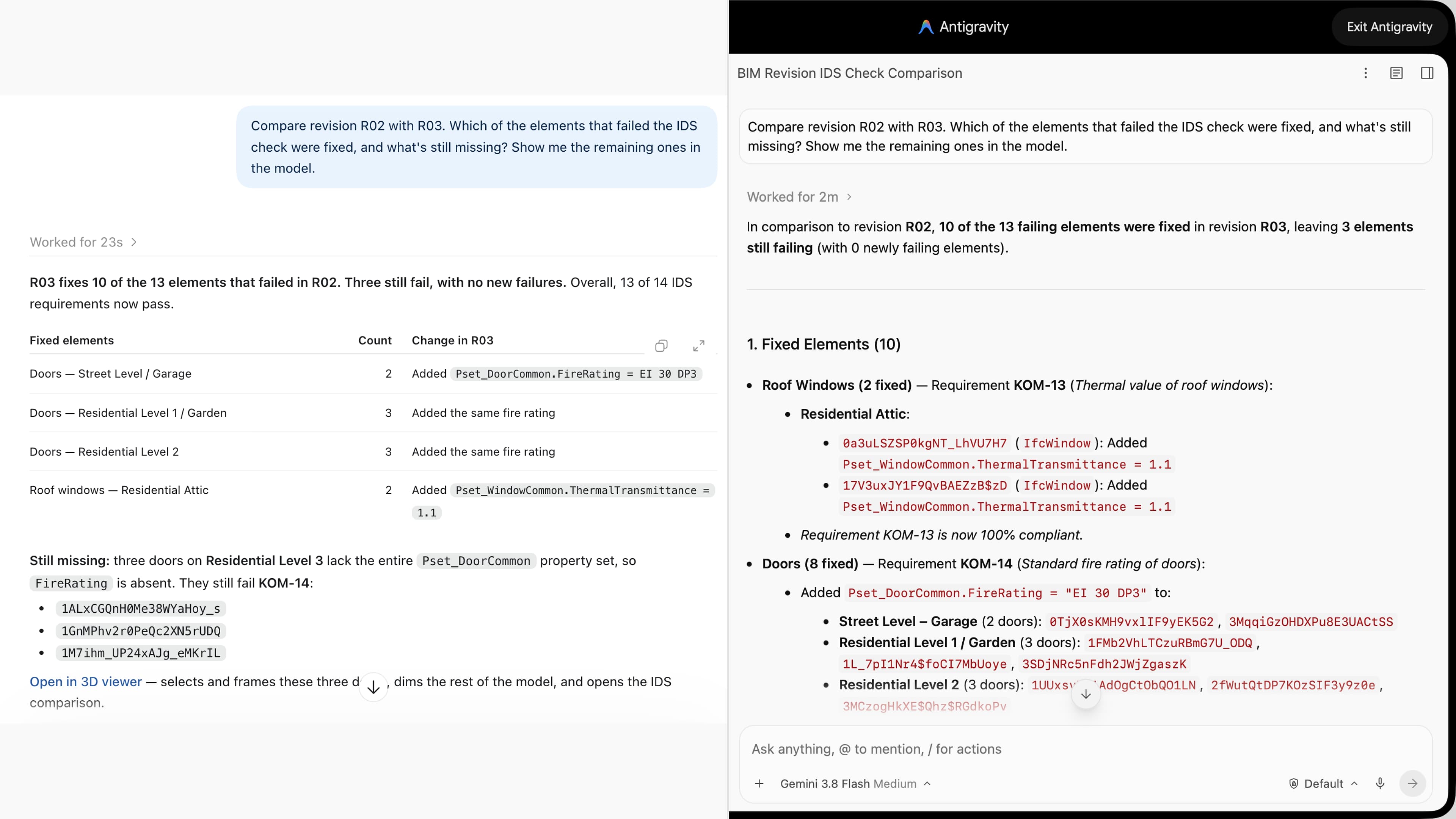
For the test, I then prepared a second revision with some of the gaps filled in, and asked the question every team asks after a revision: what got fixed, and what’s still missing? The AI called the comparison and validation tools, and the results were matched by element ID. Ten of the 13 elements were fixed. Three doors on Residential Level 3 still lacked a fire-rating value in the required model property. Then the AI handed me a link that opened the model with exactly those three doors highlighted.
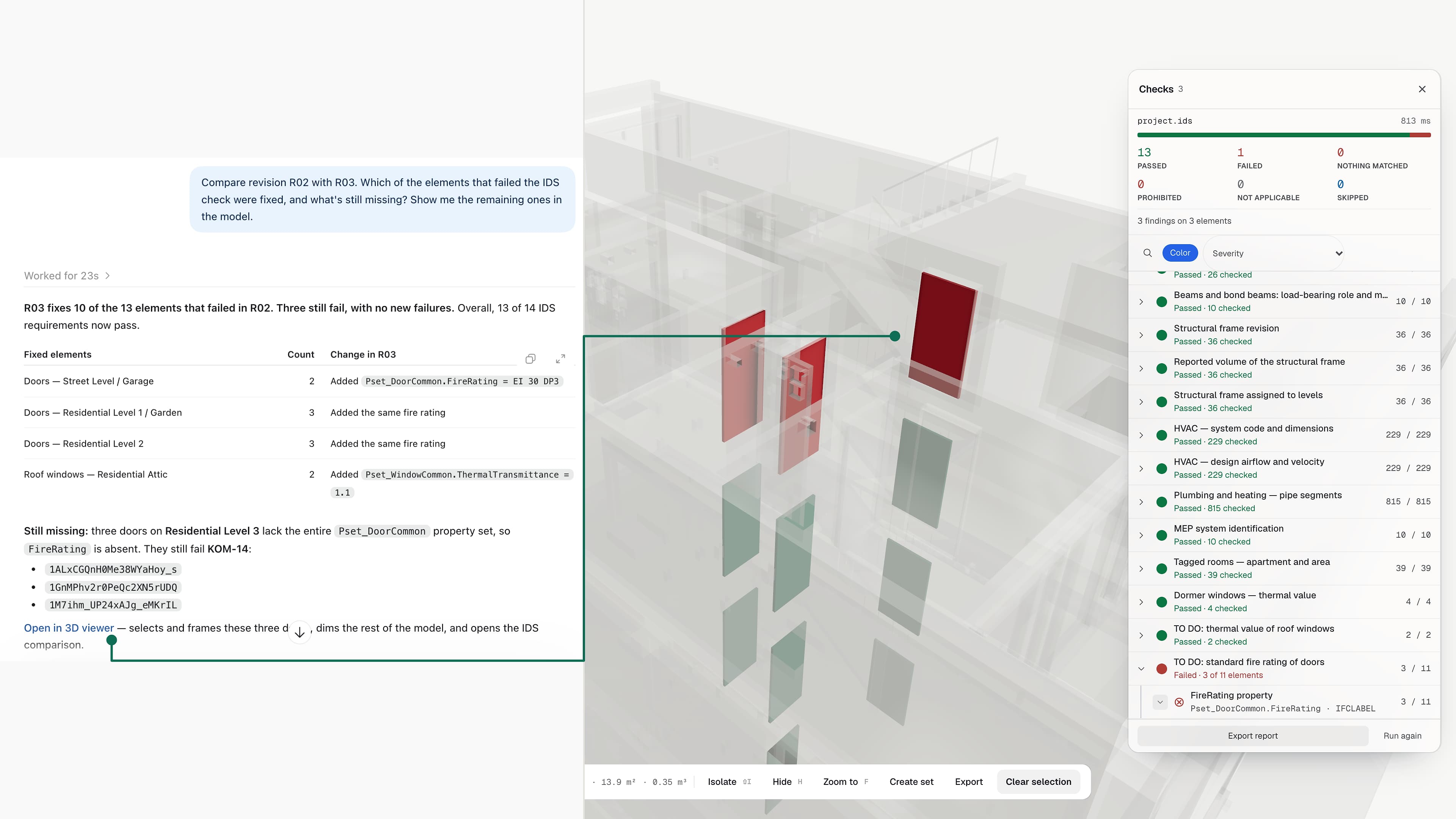
I ran the whole demo in two different AI apps: ChatGPT, and Gemini in Google Antigravity. In that test, both reached the same findings with the same server and the same tools. That doesn’t mean every AI app connects the same way; each product has its own setup and limits. But the server didn’t need to know which AI was asking. That is the point of a standard.
Writing the code was the easy part. Three things mattered more:
- Tool descriptions are the user interface. The AI picks tools by reading them, so they deserve the same care as button labels.
- Summaries beat data dumps. Return counts and the top results, with details on request. Sending the AI an entire model overloads its working memory and makes answers worse.
- Units and IDs, always. Every number carries its unit and every element its GUID. Ambiguity is where AI starts guessing again.
None of this replaces the checker. It makes the checker easier to question.
Where the industry stands
In under two years, MCP went from an experiment to a feature that major AEC vendors ship with their products.
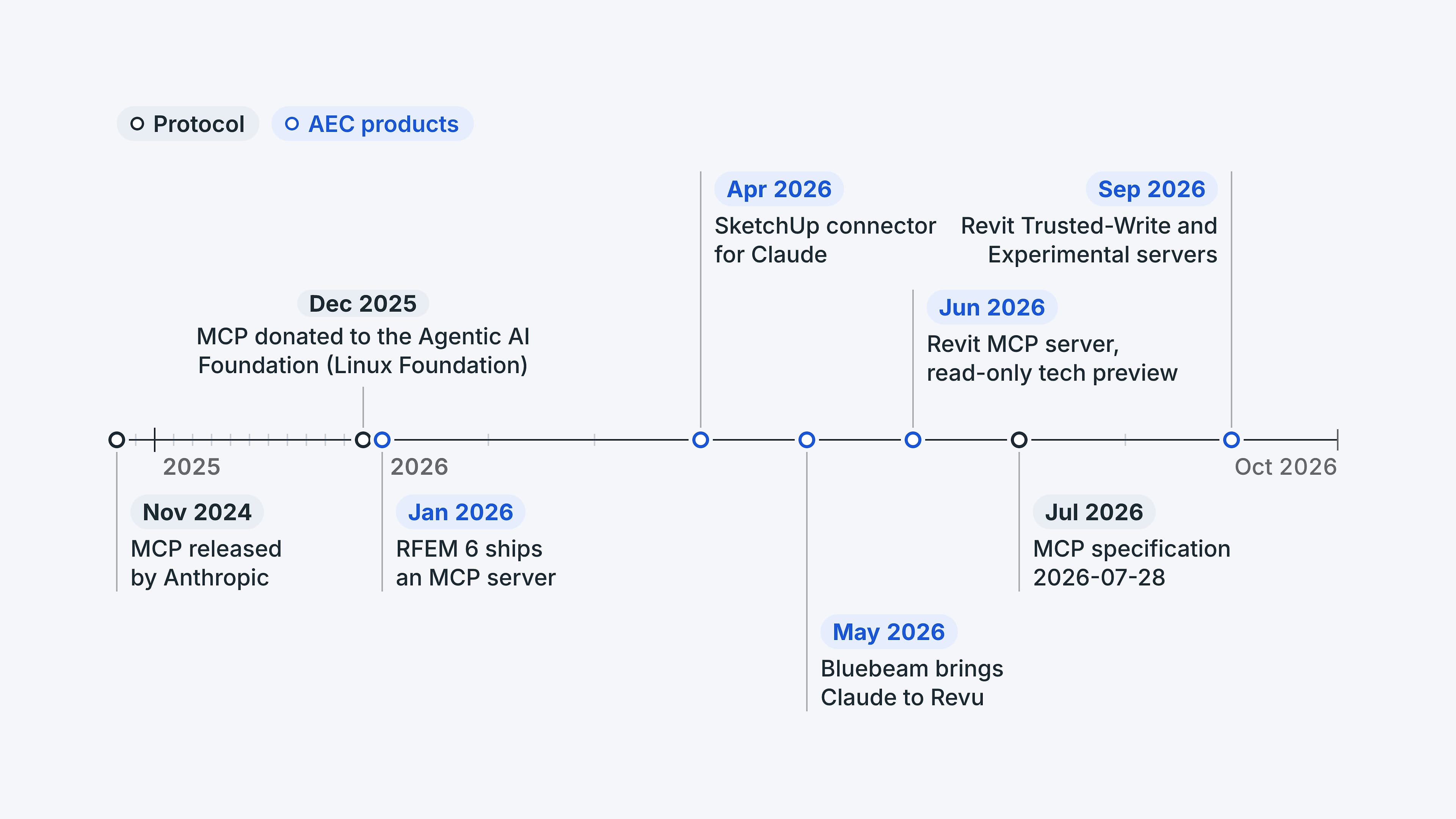
Anthropic released the standard in November 2024. Since then, AEC vendors have started shipping MCP connections, each with its own scope and conditions:
- Revit (Autodesk): a read-only MCP server since June, joined in September by Trusted-Write and Experimental servers. All are technical previews for Revit 2027.
- Revu (Bluebeam): an MCP connection to Claude. It requires a Bluebeam Max plan, Revu 21.9 or later, and the Claude desktop app.
- SketchUp (Trimble): a Claude connector that creates new SketchUp models from a conversation. It can’t edit existing files, and Claude is currently the only supported AI provider.
- RFEM 6 (Dlubal Software): Dlubal introduced an MCP server for RFEM 6 in January 2026. It works through the Dlubal API and is installed separately under the current setup procedure. Details are in Dlubal’s knowledge base article and API documentation.
These products change quickly, so check the current conditions before you plan around them, and don’t assume any of them connects to every AI app out of the box.
Vendors also make different design choices. Some servers expose a few narrow, purpose-built tools. Others let the AI write scripts against the program’s API, much like a Dynamo or Grasshopper script, except the AI writes it. The reach depends on what the server exposes and the permissions behind it. Narrow tools give everyone safe defaults; scripting gives power users more reach, at the price of reviewing and testing the code the AI writes. My own server sits firmly at the narrow end.
Long-running jobs, such as a large analysis or a heavy model check, have their own pattern in MCP: Tasks. They started as an experimental feature, and the July 2026 specification moved them into an official extension. They only help when both the AI app and the server implement them.
What MCP won’t fix
MCP removes the friction between engineering judgment and its execution. It does not replace the judgment, and it brings a few new risks of its own.
- Responsibility stays put. Using AI doesn’t remove the engineer’s responsibility to review the result. The AI doesn’t stamp drawings, and how liability is allocated is a question for your contracts and legal advice.
- Garbage in, garbage out, faster. MCP automates a messy process just as faithfully as a clean one. Inconsistent parameters and missing classification codes (UniFormat, OmniClass) will surface sooner, not disappear.
- AI-written code needs review. When a server runs scripts that the AI writes, some of those scripts will be wrong. Review the code, test on a copy, and keep analysis results under version control.
- Know where the data goes. A local server keeps the model on your machine, but the AI host still sees whatever the tools return, and read-only access doesn’t change that. Check your AI provider’s data-retention and training terms before connecting live projects.
- Model data can carry instructions. A property value or a document comment can contain text that tries to steer the AI. Read-only access limits changes to the model; it doesn’t prevent misleading answers or data exposure. Start with a trusted server, restricted access, and a test model your firm has approved.
- It isn’t free. Budget for AI subscriptions, API access or add-on licenses on the software side, and workstations that can keep up.
How to start on Monday
Start small: one project, one read-only task, one person who’s curious. Before that, ask your software vendors five questions:
- Do you ship an MCP server, and is it official or community-built?
- Is it read-only, or can it change the model? Are the two separated?
- Does it run locally or in the cloud, and where does project data go?
- Which AI applications have you tested it with?
- How is it licensed and billed?
Then run a pilot. Choose one recurring task, such as checking a model revision against the project’s information requirements, and a test model your firm has approved. Compare your current workflow, including any checker you already use, with the AI-assisted version. Count the review time, missed issues, and false alarms as well as the time saved, and repeat it on another revision before deciding. That comparison will tell you more than any vendor demo.
A bridge, not a replacement
MCP won’t design a building. What it does is let AI reach the tools that already do the engineering, so the hours between a question and its answer shrink.
Picture the next step. One outlet finds the elements that changed in the latest model revision. A second sends them on to the next tool, an analysis program or a coordination platform, provided the models and their element IDs are linked, which is still one of the hardest parts of the job. The AI connects the steps and puts the result in front of the person who decides. The pieces exist today; every step still needs someone who checks the result.
The AEC software we rely on is excellent at engineering. The AI platforms are excellent at language and reasoning. MCP is the outlet between them, and it’s worth learning how it works before your competitors do.
My own view: access to good building data helps AI answer questions about a specific project more effectively. I trust the large U.S. providers with it. Your contracts still set the rules for each project. In a few years, asking an AI about a model will be as ordinary as searching Google.
Prefer to listen? This article has a companion episode of the Insights podcast, built around the same test.

Listen to the conversation
Martin and his co-host Sarah work through this article with a practical case, in English.
Chapters
Episode produced with AI voices from this article. Script reviewed by Martin.
Sources
- [1]Anthropic: Donating the Model Context Protocol and establishing the Agentic AI Foundation
- [2]Model Context Protocol: 2026-07-28 specification release
- [3]The Register: Model Context Protocol prepares to break with its stateful past
- [4]Dlubal Software: Integration of RFEM 6 into AI applications via MCP server
- [5]Dlubal API documentation: MCP server
- [6]Autodesk: Introducing the Revit Public MCP Server
- [7]Cadalyst: MCP, a new standard for connecting AI to AEC software
- [8]Microsoft 365 Roadmap: Custom MCP connectors in Microsoft 365 Copilot
- [9]Google: Set up a custom MCP server connection in Gemini Enterprise
- [10]ifcopenshell-mcp: open-source MCP server for IFC models
- [11]Revizto MCP Server
- [12]Model Context Protocol: Key changes in the 2026-07-28 specification
- [13]Autodesk Community: Revit MCP server tech preview launch (Trusted-Write and Experimental)
- [14]Bluebeam: Use MCP with Claude in Revu
- [15]SketchUp: SketchUp connector for Claude
Working on a similar challenge?
If you’re connecting AEC software to AI assistants or planning an MCP pilot, I’d be happy to compare notes.

Keep reading

